Well, sort of. Lemme ‘splain.
tl;dr If you hate whimsey, I’m sure there’s a pedants’ reddit somewhere that would make you happier than this post.
About 18 months ago I started working at Nylas as an SRE. If you haven’t heard of us, we’re an API for email/contacts/calendar backends. Think Stripe for inboxes — we do all the hard work of inbox integration so you don’t have to. This isn’t germane to the story, but I ❤ my team and you should come work with us. Also this entire thing came out of my working at Nylas, so it wasn’t only a plug 😉
Anyway, one of our engineers— we’ll call her Halla (because her name is Halla) — and I sat right across form each other, separated by some huge monitors. We got into a routine wherein she would lean way over to peer around said monitors and get my attention with “Hey Jeremy!” Because reasons, we found this amusing and it be came “our thing”. When Halla announced that she was relocating across the country, I lamented to her the loss of our routine. We laughed/joked about me building a system where she could connect to video chat on a tablet that would tilt out from behind my monitor, and be able to engage me with “Hey Jeremy!” once again.
Right. Like that would ever really happen.
The idea sat for 6 months until Halla came back for a company offsite. We got to do our routine again, and we had a good laugh about it. From there I was determined that this thing must come to be. Yes, I was going to spend time and money to construct some silly contraption to pop my colleague out from behind my monitor, dammit.
We had a free day during the offsite, and I resolved that I would use mine as a hack day. In preparation, in no particular order, I picked up a box of popsicle sticks, purloined some pink duct tape from the office (I have no idea why we had pink duct tape, but it’s awesome), and packed up some small nuts & bolts and electronics parts I had lying around. I also managed to get my boss to bring drill bits from home, and had our office manager grab the office cordless drill (I had forgotten them), just as they were hitting the road, because #organized.
On the drive to Tahoe (I told you to come work with us) I brainstormed some requirements:
- Slack activated (we use slack, so natch)
- Works from anywhere (don’t want to be mucking about with dns, ip addresses, or firewalls)
- Easy to use (else it won’t gets used)
- Fun! (because fun)
The hack day came and, as some coworkers went skiing, some others rock climbing, I set about tinkering, drilling, programming, and making a terrible mess. It was wonderful! I even managed to drill through my finger at one point, which, while less wonderful, it does allow me to truthfully say I shed blood for this project… so there’s that.
Anyway, six hours, some python, some blood, and lots of learning later and… voila!

If that’s not entirely obvious, check out the annotated version below.

I used the Raspberry Pi to control the servo, which would rotate the yellow arm and thereby lift the beige arm, and thus pivot the iPad to the left, emulating Halla. I initially leaned toward an Arduino for the servo control because they run in real-time and are therefore more reliably precise for such things. But with all the other logic and networking that needed to happen, and the lack of precision that I needed in the controls, I decided to save a ton of work and time and just use the Pi for everything. I was already doing so many new things that narrowing the scope a little seemed wise.
In reality, this was as much an excuse to play with some tech I’d never worked with before as it was a means to a virtual Halla: SQS, servos, controlling servos with a Pi, Slack commands, etc…
Observations:
- Drill bits are sharp, and will readily bore through flesh.
- The popsicle sticks you buy in a craft store are vastly inferior to the real thing. These things split if you look at them hard enough. Seriously, I could barely tighten the bolts, lest splinters abound.
- Raspberry Pis are ridiculously low-power. I operated the entire project off that USB battery all day, with juice to spare.
- Servo control isn’t as obvious as one might think.
I hear you saying, “Ok Jerm, so you slapped some junk together, but where’s the magic? Where’s the serverlesssss???” And to that I say… “In the cloud!”
One of the requirements of this project was that it had to be completely non-invasive from a network setup standpoint. If this was going to live on my desk at work, there would be no firewall-hole-punching to get Slack talking to the robot. No, this was a job for serverless.
We’ll start with my data path, which can be visualized thusly:

In my case, The Cloud is AWS.
As I’m a heavy AWS user in my professional life, I went with this familiar environment. I was already taking on a bunch of new challenges in the project, and needed to finish before supper. They also have their lovely free tier, and as my $0 budget for this project had already been blown by $10 of popsicle sticks (750 popsicle sticks… The website lies, this was the only option they had. Anyone need some popsicle sticks? I have like 725 left. I’m not kidding), it was a super-attractive option.
I wanted Slack integration, so an AWS Lambda function fronted by API Gateway seemed like a natural fit. I’m a bit of a Pythonista when Bash won’t do the job, so I employed the excellent Zappa framework, having used it to great effect previously with an Alexa skill I built.
So, Slack sends messages to my API gateway endpoint, which passes the request to Lambda. The Lambda function sends commands to the Bot via SQS, but not before doing some crucial validation, namely: who sent the request.
Why SQS? Why not? It’s reliable, almost-always lightning fast, free, and really simple. I also wanted something with high ephemerality so that I wouldn’t have to deal with old cruft like, for instance, a week’s worth of requests from when the bot was off. I can crank the message lifetime down to 60 seconds on the entire queue, which, while not as short as I’d prefer, made me pretty happy.
At the other end of this is a bunch more python running on the bot itself, because not only do I have to receive these messages, I have to do servo control as well (discussed more in part 2).
In the end I ended up with this:
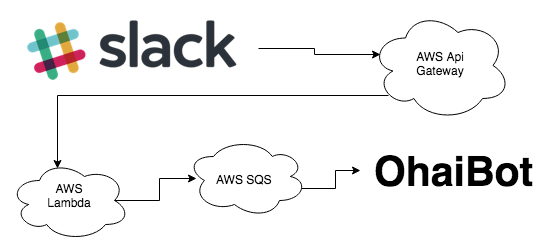
Except imagine those first couple arrows point both ways as well — you’ll get told to go away if you’re not authorized to use the bot, for instance.
This is the part where I’d link you to the code, but alas, I wasn’t using version control, and have completely overwritten the original code with ~73 iterations. I’ll post the new stuff with all the relevant context in, once again, part 2 (sorry).
To summarize: The process starts with typing /ohai into Slack. That activates a custom Slack integration that hits an API-Gateway endpoint that activates some Python code in Lambda, which drops a message in an SQS queue on which OhaiBot is listening. OhaiBot activates the servo while the Lambda returns a chat URL to the calling user, into which the iPad is already logged (making the iPad auto-connect was outside the scope of this project).
Lo and behold… it actually worked. Mostly.
It turns out that when you’re using a cheap-ass servo that came in an electronics kit to pivot nearly a pound of iPad on a bolt stuck through a plastic box, you run into an unfortunate imbalance in your needed torque vs available torque equation (Narrator: there was no equation). What you end up with is a monstrosity of a leverage system to gain enough mechanical advantage to get the thing to move far enough to call it a “successful proof of concept”. And below you can see my “successful proof of concept”!

Unfortunately, because I get so involved in the doing of the project, I often forget about the recording of the doing of the project. So you’ve now seen all the images I have of this iteration, and there is no video.
Suffice to say, I got the end-to-end demo running just before dinner, and there was much rejoicing (yay!).
Stay tuned for Part 2, where I up the absurdity and decide to make a real(er) version of this thing!
 jermops.com